

What is Citation in a Research Paper, Complete Guide 2026
What Is Citation in a Research Paper? Complete Guide
A citation in a research paper is a formal acknowledgment of any external source — book, journal article, website, or dataset — that informed your writing. It tells your reader, “This idea didn’t originate with me; here’s the source.”
Each citation includes two parts. There is the citation itself that is embedded in your text, and there is the full citation that will be included in the references, Works Cited page, or bibliography according to the citation style you choose. Both parts are necessary for a complete citation.
The importance of citations – beyond avoiding plagiarism:
- Citations help you create a credible argument based on research.
- Your sources can be checked for their reliability.
- It places your research into the context of previous studies on the topic
- It protects you against accusations of plagiarism, which have dire consequences
What are the types of citation in research
Knowing the type of citation in research means that one will be able to follow particular standards when writing their paper. Usually, a specific style is determined by one’s major or by the guidelines of a particular journal.
The Four Major Citation Styles:
- APA — American Psychological Association Used in social sciences, education, psychology, and nursing. Follows an author-date format.
- In-text: (Garcia, 2022) or (Garcia, 2022, p. 45) for direct quotes
- Reference: Garcia, R. (2022). *The science of learning.* Academic Press.
- MLA — Modern Language Association Standard in humanities — literature, language, philosophy, and the arts. Uses an author-page number format.
- In-text: (Smith 45)
- Works Cited: Smith, John. “Reading in the Digital Age.” *Journal of Literacy*, vol. 12, no. 3, 2021, pp. 40–58.
- Chicago / Turabian Flexible style used in history, business, and fine arts. Offers two systems:
- Notes-Bibliography (footnotes/endnotes) — preferred in humanities
- Author-Date (parenthetical) — preferred in social sciences
- IEEE — Institute of Electrical and Electronics Engineers Used in engineering, computer science, and technology. Sources are numbered [1], [2], etc., and correspond to a numbered reference list at the end.
Which style should you use?
Discipline | Citation Style |
|---|---|
Psychology, Education, Sciences | APA |
Literature, Humanities, Arts | MLA |
History, Philosophy, Religion | Chicago |
Engineering, Computer Science | IEEE |
Business, Economics | Harvard or APA |
Be sure to check with your professor or targeted journal before beginning. Reformatting each reference after completing your assignment is perhaps the most easily avoided waste of time in academia.
How to write Cite Sources in a Research Paper
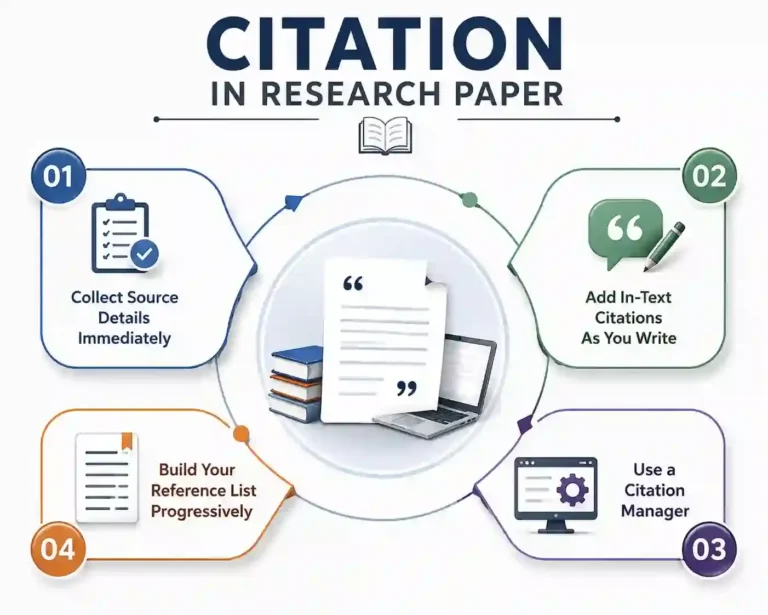
Many people make an unnecessary mistake — they wait until the entire research paper is completed before writing their citations. At that point, they have lost all the page numbers, the source URLs are no longer valid, and most of the information is already forgotten. Below is a better way to do this.
Steps to Citing Your Sources
Step 1: Get Source Information Straight Away
As soon as you find a source, make sure to gather all necessary information:
- Author(s)
- Year of publication
- Title of the article or book
- Journal title
- Volume, issue, and pages
- DOI or link
Lack of any of the above pieces of information leads to formatting problems that consume a lot of your time.
Step 2: Include In-text Citations as You Work
- Do not put [citation needed] in the text as a placeholder; you will forget about it eventually
- Always cite your sources immediately after you use them
- It applies not only to direct quotations but also to paraphrases and statistics you include
- Note: Even if you paraphrase the idea, you still need to provide an in-text citation
Step 3: Use a Citation Manager
- Do not waste time manually formatting references — it is inefficient, error-prone, and unnecessary.
- Zotero (free and open-source software) is the clear winner in 2026:
- Fully integrates with Word, Google Docs, and LibreOffice.
- Automatically formats references in APA, MLA, Chicago, IEEE, and more than 8,000 other citation styles.
- The browser plugin automatically imports all source information with just one click.
- Paperpile is a better option if you work primarily with Google Docs and PDFs.
- ❗ Important: Mendeley stopped developing its mobile apps in 2021 and has become obsolete — most researchers now use Zotero or Paperpile
Step 4: Create Your Reference List Step by Step
- Do not create a reference list right before your final writing
- Include the complete reference immediately after including the corresponding in-text citation
- Once you finish writing your paper, your reference list is complete
- This is one trick that will save you from the panic of creating the reference list at the last minute
Citation Mistakes to Be Aware Of
- Listing sources in the bibliography that have not been used in the text
- Using two different citation styles in one assignment
- Failure to provide the DOI for academic journals, whenever possible
- Not having hanging indents in reference list entries (necessary in APA, MLA, and Chicago style)
- Sentence case versus title case errors in reference list titles (APA uses sentence case, whereas MLA uses title case)
How to Check Research Paper Citations
After the publication of your paper, monitoring how many times it is being cited will give you an idea of how influential your research is. Here are the steps on how to check citations in your research papers from the four most popular databases
Google Scholar – Free
- The easiest citation checker anyone can use
- Go to scholar.google.com and enter the title of your paper; click on the “Cited by” link below the search results.
- It will bring up all the papers that cite your paper.
- Create a Google Scholar profile to monitor:
- Number of citations
- h-index
- i10-index
- All of your publications on one dashboard
- Turn on alerts by clicking on the envelope icon on your “Cited by” page – you will receive notifications whenever there is a new citation of your paper.
- ⚠️ Disadvantage: Google Scholar has an incredibly broad scope – it may include duplicate papers, preprints, and even grey literature, leading to higher citation numbers than those in peer-reviewed databases
Scopus – Institutional Access
- Provided by Elsevier, it offers better citation analysis than Google Scholar.
- Log in through your university library page.
- Go to the Author Search tab and then Author Analytics to check your:
- Full citation record
- h-index
- Timeline of publications
- Click the “Cited by” link in any of your papers to find out all the documents that have cited your papers.
- Scopus only cites journals on its curated list; thus, citations would be fewer than in Google Scholar but more credible for formal evaluations such as tenure and grants.
Web of Science — Institutional Access
- Undoubtedly, the benchmark for citation analysis in Science, technology, and medicine
- Citation Report will enable you to:
- Analyze citations annually
- Obtain an accurate calculation of your h-index
- Monitor citation trends throughout your publication history
- Most institutions and funding organizations accept Web of Science for tenure applications and grant proposals
- Should be used in conjunction with Scopus for a comprehensive view of your impact
ResearchGate – Free
- A freely available academic networking site which is frequently ignored as a citation resource – but not anymore
- Provides reads, citations, and recommendations for each paper of yours in real-time
- Especially useful when you want to:
- Watch who is currently interacting with your research
- Find out new citing papers in real-time
- Increase visibility in your research field
- Not a replacement for Scopus/Web of Science metrics, but excellent as a supplementary free real-time tool
How to track research citations
Checking citations only once is a reactive approach. Consistently Tracking research citations is the way to go for strategic information about your research impact.
Key metrics to monitor:
Metric | What It Shows |
|---|---|
Total citations | Overall reach of your published work |
h-index | Balance between productivity and impact |
i10-index | Number of papers with 10+ citations |
Citation growth rate | Whether your paper is gaining momentum |
Tracking Tips:
- Generate an ORCID iD — a free and persistent identifier that unites all your articles regardless of where you work and under what name. It is a must-have for disambiguation.
- Check your Google Scholar page consistently — the system often associates articles written by other researchers with your name because of their similarity. Make monthly checks and delete all inaccuracies.
- Compare databases — do not trust one single resource. Cross-reference Google Scholar, Scopus, and Web of Science to get an objective and defendable measure of your performance.
- Take advantage of the library feature in Zotero — besides assisting in citation formatting, Zotero allows you to monitor the development of your field and detect research gaps for future articles.
Conclusion
Citations are not just about formatting; they are the key to making your research credible, citable, and valuable. Every step counts, from your first source to your hundredth citation.
- What: An official recognition of any outside sources used in your research
- Types: APA, MLA, Chicago, and IEEE – each linked to a particular field of study
- Write: Record information on your sources, cite while you write, and leave the formatting to Zotero or Paperpile
- Check: Search for citations of your paper in Google Scholar, Scopus, Web of Science, and ResearchGate
- Track: Create ORCID ID, set up automated notifications, and compare across platforms to get an accurate impact score
The researchers who consider citations optional are the ones who struggle to add them at the last minute. Those who master citations early will write confidently, publish with ease, and establish their reputation as researchers.
Start now. Save one source properly, and you will save yourself from a lot of trouble later.
For academic writing courses and research writing content services, contact IdeaLaunch.
Need Expert Academic Support?
Approach us for an end-to-end complete Ph.D. Project assistance: we will also assist with
- proposal writing,
- research article writing with publications,
- thesis writing,
- Review Paper / Survey Paper Writing,
- synopsis writing,
- proofreading and editing, etc.
📞 Call or 💬 WhatsApp us today: +91 7904479887 | +91 7548889787 | +91 9342492103
📧 Mail us: info@idealaunch.in
📝 Get Expert Ph.D. Guidance: Topic selection, thesis writing, and complete research support